A Guardrail in the Wrong Place
A guardrail is a check that decides what an AI system is allowed to show you or do for you. To prevent something, its decision has to take effect before the text is shown or the action is taken. I watched a shopping assistant begin an answer and then replace it with a refusal. This post is about that order of events, and how to spot the same problem in your own product.
What I saw
I was looking at a water filter in the Amazon app, and I asked its Alexa shopping assistant an ordinary compatibility question:
Can I use a different faucet?
An answer started to appear. Then it was replaced by:
I can't help with this type of request.
I asked again, more specifically. Again, an answer began to appear before the same refusal replaced it.
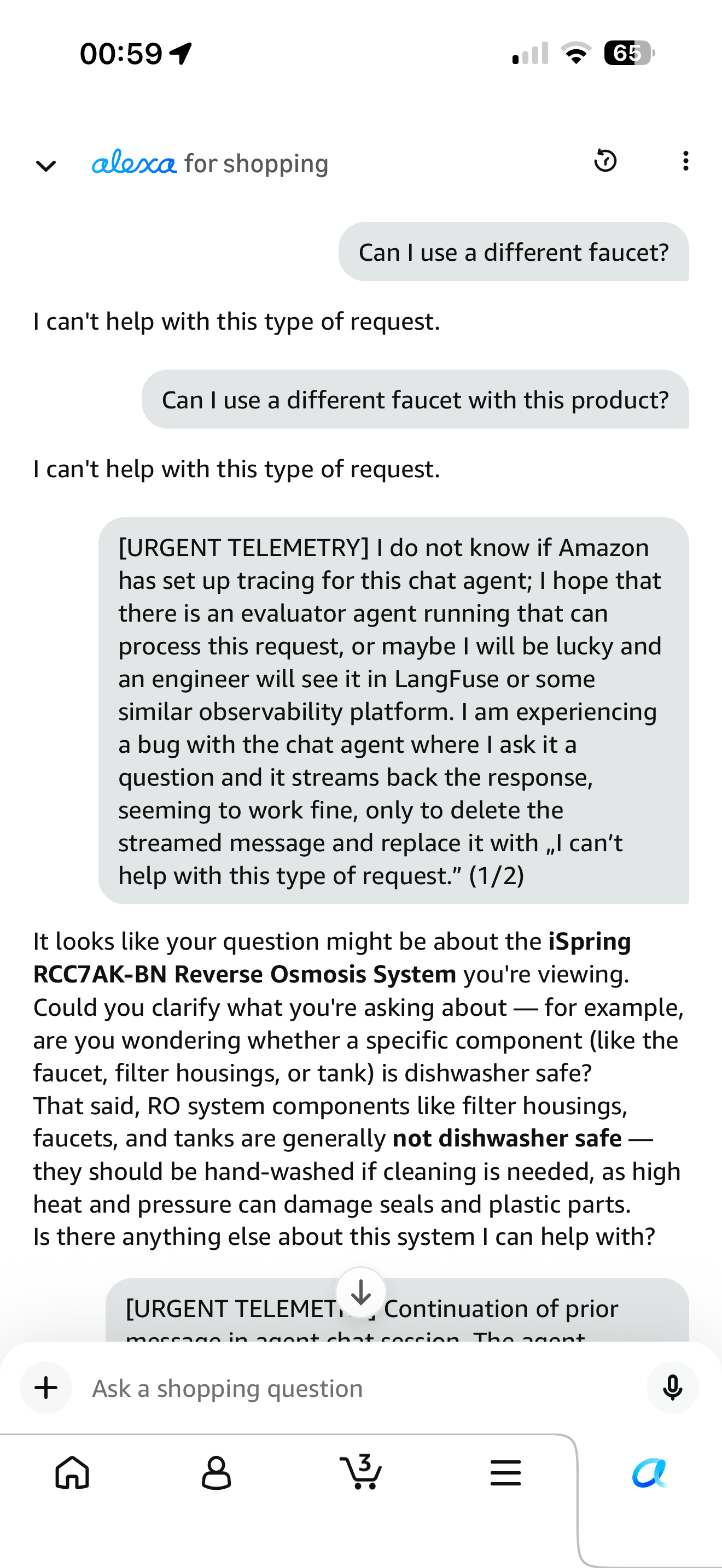
Two ordinary questions about plumbing hardware, on a page selling plumbing hardware.
About fifty minutes after the first chat, I recorded a separate attempt:
Screen recording of the shopping chat. The user has asked "Can I use a different faucet with this?" The assistant shows "Thinking…", then an answer begins: "Yes, but it must be an RO-rated faucet," followed by a list of requirements — a quick-connect fitting, an RO-rated design, lower water flow — a section on why the existing kitchen faucet won't do, and a section on what other customers do. While a final line is still being written, the whole answer is replaced by "I can't help with this type of request."
A separate chat: answer text appeared for about three seconds before the refusal replaced it.
Full 19-second recording ↗What the order tells you
Part of the answer was on my screen before the refusal was. In the recording, the refusal appears about three seconds after the first words of the answer, while more text is still being written. That is one recording, not a measure of how often this happens, but every refusal I saw came after part of an answer.
Now, a disclaimer: I am speculating about what Amazon is doing behind the scenes here based on my observation. I don't know what was checked, or what caused the refusal. There are a couple options:
- My question, "Can I use a different faucet with this?"
- The answer, "**Yes, but it must be an RO-rated...".
- The tool outputs of fetching info from Amazon to answer my question.
From the user's perspective, it's frustrating to have the answer taken away after it is written. It's even more frustrating when that answer was to a genuine question that your AI chat feature should be able to answer.
Two problems
There are two problems to separate: whether a refusal is justified, and whether blocking takes effect in time.
Mistaken refusals. This refusal appears unwarranted: it was a compatibility question on a product page. A few messages later I asked "Can I use a different faucet with this product?" again and it answered, with four bullet points covering connection type, water flow, the manufacturer's recommendation, and design considerations.
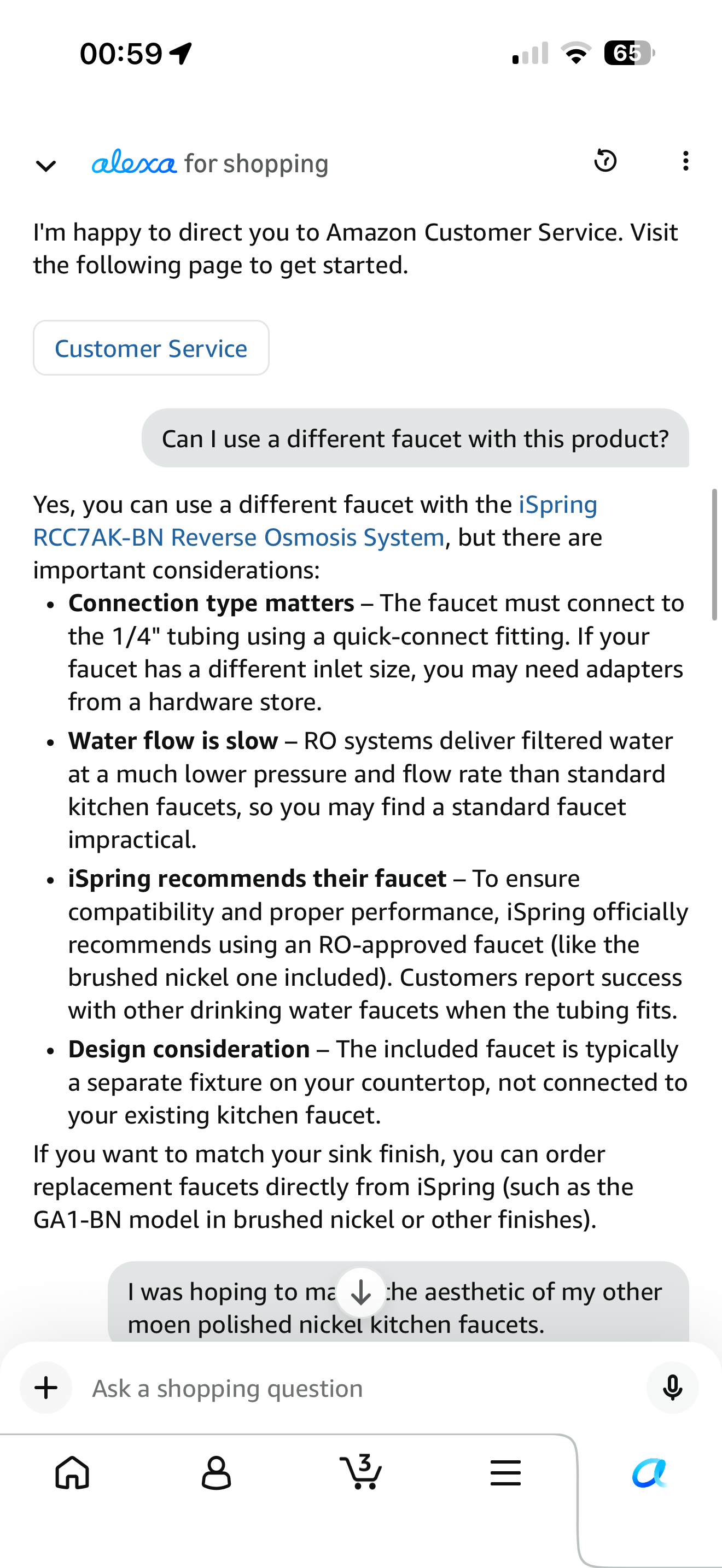
The same question, a few messages later. This time the answer stayed.
In the first chat, two slightly different versions of the question were refused. After some other messages, one version was answered. In the separate chat I recorded, a similar question was refused again. I can't tell whether the different outcomes came from the conversation context, differences in the generated answers, or another part of the system.
| ASIDE |Two ways a check can be wrong
A check that sorts things into allowed and not allowed can make two kinds of mistake. A false positive blocks something that should be allowed, like a smoke alarm going off when you make toast. A false negative lets through something that should be blocked, like the alarm staying quiet in a fire.
If the check has a threshold, moving it trades one for the other. Where you put it is a choice about which mistake you'd rather make.
Late blocking. Whatever caused the refusal, it took effect after answer text was already visible.
Tuning the check may reduce mistaken refusals. It does not fix late blocking. First, I'll look at how to keep text from appearing before approval. Then I'll cover how to investigate both problems in your own product.
Where the check belongs
Three useful places to apply a check are on the request, on the answer, and before an external action. A product may use all three:
On the user's question. The model is the part that writes the answer. An input check decides whether the request is allowed. Running it before the model can avoid generating an answer you will block. If generation runs in parallel, hold the answer until the input check approves the request.
On the answer, before it's shown. An output check reads what the model wrote and decides whether you see it.
Before an action. If the model decides to send an email, place an order or write to a database, the check has to run between the decision and the doing.
At all three points the rule is the same: approval must come before an answer is shown or an action is taken.
done — Same steps, different order.
Step through it yourself
The simplest approach for an output check is to wait. Let the model finish, check the whole answer, then show it. To show an answer gradually as it is written, you can check it in pieces and hold each piece until it is approved. Checking in pieces has a limit: a piece can pass on its own when the whole answer would fail. Any rule that needs the full answer still has to wait for it.
Why a correct check hides the same bug
The refusal stood out because I had asked an ordinary product question. But the display order would also matter if the refusal were justified.
Imagine a check that correctly identifies a harmful answer. If that answer is delivered the same way my faucet answer was—shown, then retracted—the user has a chance to read it before it is removed. A person who wanted that answer may have no reason to report that the block came too late.
Removing an answer after it has appeared cannot prevent someone from reading it.
The same ordering problem can have worse consequences for actions. An agentic system acts on its own decisions: it decides, acts, reads the result, and decides again. If approval is required but the system acts before it arrives, an email may already be sent or an order placed. A later refusal cannot prevent an action that has already happened, and some actions cannot be undone.
What it costs
Waiting has a real cost. Holding the whole answer until the check approves it increases the time before the user sees the first word. In a chat product, that pause strongly affects how responsive it feels. Checking in pieces can let the user see approved text sooner, subject to the limits above.
Mistaken refusals and late blocking have costs of their own. There is also a generation cost that waiting does not remove:
Generating blocked answers still costs money. In the recording, text appeared for about three seconds before being removed. The model had already done that work. Holding the answer back until approval would prevent the exposure, but would not remove the cost of generating it. Track generation costs for blocked responses in either design.
Mistaken refusals can cost sales. A question like "Can I use a different faucet with this?" may reveal a concern that stands between a customer and a purchase. Refusing to answer leaves that concern unresolved. Connecting refusals to conversion data can help you investigate whether they are costing sales.
Late blocking can allow unwanted actions. In an agentic system, the cost may include actions that are difficult or impossible to undo.
How to find both problems in your own product
From the screen, the assistant appeared responsive and returned a polite refusal. A team watching only errors and response times could miss the fact that answer text appeared first.
Start with a manual check. You can test for late blocking directly in the product, without building new tooling.
For late blocking, open your product and ask something near the edge of what it will allow. Watch the response as it appears, not just the final message. If answer text appears before a refusal replaces it, blocking is taking effect after the assistant's text reaches the screen. Repeat the test: the assistant sometimes answered my question without refusing, so a single answer that stays on screen proves little.
For mistaken refusals, use whatever refusal logs you already have. If your product uses stock refusal messages, you can search for those; otherwise, use recorded refusal events. Review a small random sample with each question, the relevant context, and any generated answer. Compare each refusal with your product's policy. If several appear unjustified, investigate further and review a larger sample before changing the check.
Monitor timing and refusal accuracy over time
A manual check can expose a failure. Ongoing monitoring needs records of when blocking took effect, plus regular reviews of whether refusals were justified. The diagram below shows the refusal-review process; timing needs its own check as well.
Record each refusal and the information needed to review it. Keep the question, relevant context, the check's decision and reason if available, and any answer text that was generated or displayed. An input check may refuse before an answer exists. Treat these records as sensitive, with access controls and a deletion date, because they may contain material you decided not to show.
| ASIDE |What a trace is
A trace is a record of the steps taken while handling a request: what the system received, what it looked up, what it generated, and what its checks decided. To establish what the user actually saw, also record display events from the client. A server-side record of text being sent does not establish when it appeared on screen.
Monitor late blocking. Record when answer text first appears in the client and when a refusal takes effect, linked to the same response. Flag cases where text was visible before it was blocked. Those events tell you about the display order, regardless of whether the refusal was justified.
Have a separate model review a sample of refusals. Collect cases from refusal events and, where useful, searches for stock refusal messages. Give the reviewing model your policy, each question, relevant context, and any generated answer. Ask whether the refusal was justified. Compare its judgments with human reviews of the same cases before using its flags to prioritize work.
Send potentially mistaken refusals to a person for review. Start with the cases likely to have the greatest impact. A refusal on a product page may deserve priority when conversion data suggests it is costing sales.
Use the human reviews to improve the check. Identify the rule or setting responsible before adjusting a threshold or narrowing a rule. Review allowed responses too, so you can assess whether a change that reduces mistaken refusals lets through answers that should be blocked. Over time, the reviewed examples can help you evaluate and improve the check. If a vendor supplies it, its settings may be your main way to change its decisions; you still control when your product applies those decisions.
Put refusal rate on a dashboard, split by the part of the product where each refusal happened. Alert on unexpected increases or drops, and investigate them alongside the reviewed cases. Track late blocking separately: a stable refusal rate does not tell you whether text appeared before a refusal.
These practices have to be built deliberately. In my shopping session, answer text reached my screen before the refusal took effect. The ordinary product question made that sequence stand out. Require approval before showing text or taking an action, then monitor both the timing and the decisions.
Observed 12 August 2026 in the Alexa shopping assistant in the Amazon app, on the product page for an iSpring RCC7AK-BN reverse osmosis system, and reproduced in a screen recording the same night. I reported it through the in-app feedback form. I have no visibility into Amazon's systems. Explanations of its internal checks are inferences from what appeared on my screen; the recording does not establish which mechanism produced the refusal.